
Custom Google Docs App for your school
So maybe I’ve been reading to much Lifehacker lately. But I got to school this morning and some how got thinking about how I could hack-up the Google Doc Application that you get from Google when you install Google Gears to work with our school educational Google Apps domain.
So here are the steps on how to do it for your own school domain.
Mac
1. Download the app by clicking here.
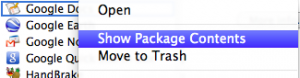
2. Control+Click on the app and select “Show Package Contents”
3. Navigate to Contents-MacOS-launch.sh file
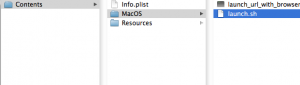
4. Control+Click on the file and open with TextEdit
5. You will see the value http://docs.google.com/a/yourschooldomain delete that and copy and paste the web address to your google apps. It should look something like http://docs.google.com/a/yourschooldomain
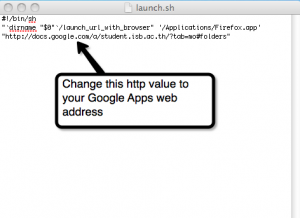
6. Save your changes to the launch.sh file
7. Drag the app into your application folder or to your dock and launch.
Bounce:
While in the launch.sh file you’ll also see the code to launch your web browser. You can change this to be the web browser of your choice. Safari, Firefox, or Google Chrome. I set it for Firefox for all our teachers at school, but use Google Chrome on my own computer.
PC
If you are on a PC Google just creates a shortcut for you on the desktop to the web page.
Why?
Teachers at our school have really started to use Google Docs; from team meeting notes, to creating unit plans and sharing them out. The problem was that teachers didn’t want to have to remember one more URL, and for many they have so many mismanaged bookmarks that they can’t find things they have bookmarked.
So what this does is “reduce the clicks” as I’m always preaching. Now it’s one click and you’re to your docs! The simple app for the Mac just makes it nice and simple with a little design feature added in and easy to attach to an e-mail and send out to the staff.





Just Blogged: Custom Google Docs App for your school http://bit.ly/8innKT (via @jutecht)
RT @jutecht: Just Blogged: Custom Google Docs App for your school http://bit.ly/8innKT
Custom Google Docs App for your school | The Thinking Stick http://bit.ly/7l7GQg
Reading: "Custom Google Docs App for your school | The Thinking Stick" ( http://bit.ly/8BOkLv )
Google Apps for your school – Jeff Utecht: http://www.thethinkingstick.com/custom-google-docs-app-for-your-school
RT @AnitaBK: Google Apps for your school – Jeff Utecht: http://www.thethinkingstick.com/custom-google-docs-app-for-your-school
Custom Google Docs App for your school – http://bit.ly/8innKT (via @jutecht)
RT @iLEADCommunity Custom Google Docs App for your school – http://bit.ly/8innKT (via @jutecht)
[…] Custom Google Docs App for your school | The Thinking Stick […]
Hi Jeff
I was wondering if this just works for private computers (laptops) or whether it is clever enough to work on a shared machine? I imagine I’m being optimistic because partly the principle of gears is offline access. Even if just laptops this would be a great addition.
Dai
Actually, we just tried to install in on a shared machine and couldn’t get it to work. Not sure why as basically it’s a shortcut to the login for Google Apps. Might be something to do with the way our MacBooks are set up.
Great little tip that will make the launch Chrome speedy. Thanks.