iPhoto your Portfolio
Today I’ve been working with the first grade team preparing to created their e-portfolios for the kids.
 We started off the year talking about how we could organize the photos and movies that would be taken over the year so that when it came to this stage of the process it would be as quick and easy as possible. With 30 days of school left the last thing teachers want is to spend their time learning a new skill.
So here’s what we’re doing:
1. In August we set up an Album in iPhoto for each student
2. As teachers and assistants took pictures and videos they put them into each students album
3. In iPhoto we then created a slide show
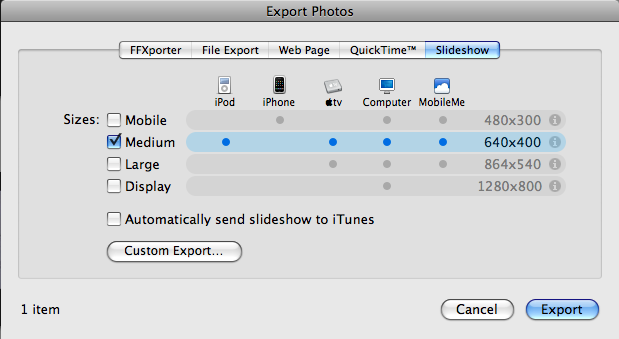
4. File – Export – Slideshow – Medium size
That’s it……cute little e-portfolio for 1st grade students of pictures and videos throughout their year of learning.
It took longer for the videos to render (about 15 minutes) then it did to do the whole rest of the process.
The key to the whole thing is starting in August with a plan of how to keep track and organize the photos and movies.
iPhoto makes this easy. As soon as a teacher connects their camera to the laptop iPhoto pops up and teachers could quickly drag the right photo into each students album.
Just another way of using pictures and media to record learning.






RT @jutecht: iPhoto your Portfolio http://tinyurl.com/c3r6ay Love this idea. So easy.
Thanks for the idea, Jeff! I will be passing this along. I was wondering whether or not the e-portfolios are used in any manner for assessment, or if the purpose is strictly to create an archive of student learning.
In 1st grade these are being used strictly for creating an archive of student learning. There are better ways to do this for assessment and actual student involvement. But for what the teachers were after this makes it nice and simple.
Thanks for this. We are interested in e-portfolios for MYP Grades 6 – 10…require reflections and evidence of student work and school like requiring a combination of text, video, images….any suggestions or examples?
Yes for these grades I would suggest a blog where the students are in control of their own content. Tomorrow I’ll write a blog post on what we’re setting up here and how Shanghai American School is using blogs to do this.
Well, Best example of site for eportfolio will be Glogster.com. You can also create teacher accounts just add /EDU. Students can add pictures,sound and Videos in an interactive way. Just don’t create too many Student accounts hard to manage.
We tried used Glogster.com a couple weeks ago and found it very clunky. Would love to see some examples of how you are using it.
Great idea. Would it work even easier with a smart album and faces in iPhoto 09? Something to check out for next year maybe.
I was thinking that you would have to have all the photos on one computer for this to work. Is that what you did?
For kids to have more input into the process they could make a photo book- autoflow for the little kids or kids choose their favourites to insert.
Then either export as a movie or print but as a pdf for parents to view. Kids could have some text to go with it that way.
Looks all professional and hard to do but absolutely dead easy.
I like this idea for our youngest students – we do have a portfolio for our EY students right now but this is entirely created by the assistant in each class with photos and movies. This way it seems much easier! Thanks!
[…] The rest is here: iPhoto your Portfolio « The Thinking Stick […]
[…] E-Folios for students A couple days ago I shared how the 1st grade here at ISB is creating Portfolio’s for students using iPhoto. They are simple Quicktime movies that kids can start and stop with their parents as they talk […]
Do you have to work with Mac in order to use iPhoto?
Great idea for all grades.
Yes, iPhoto is only available on a Mac platform.
[…] thanks to Jeff Utecht for the idea. Be sure to pass it along to your […]